Nesting preview and billable sheet calculations
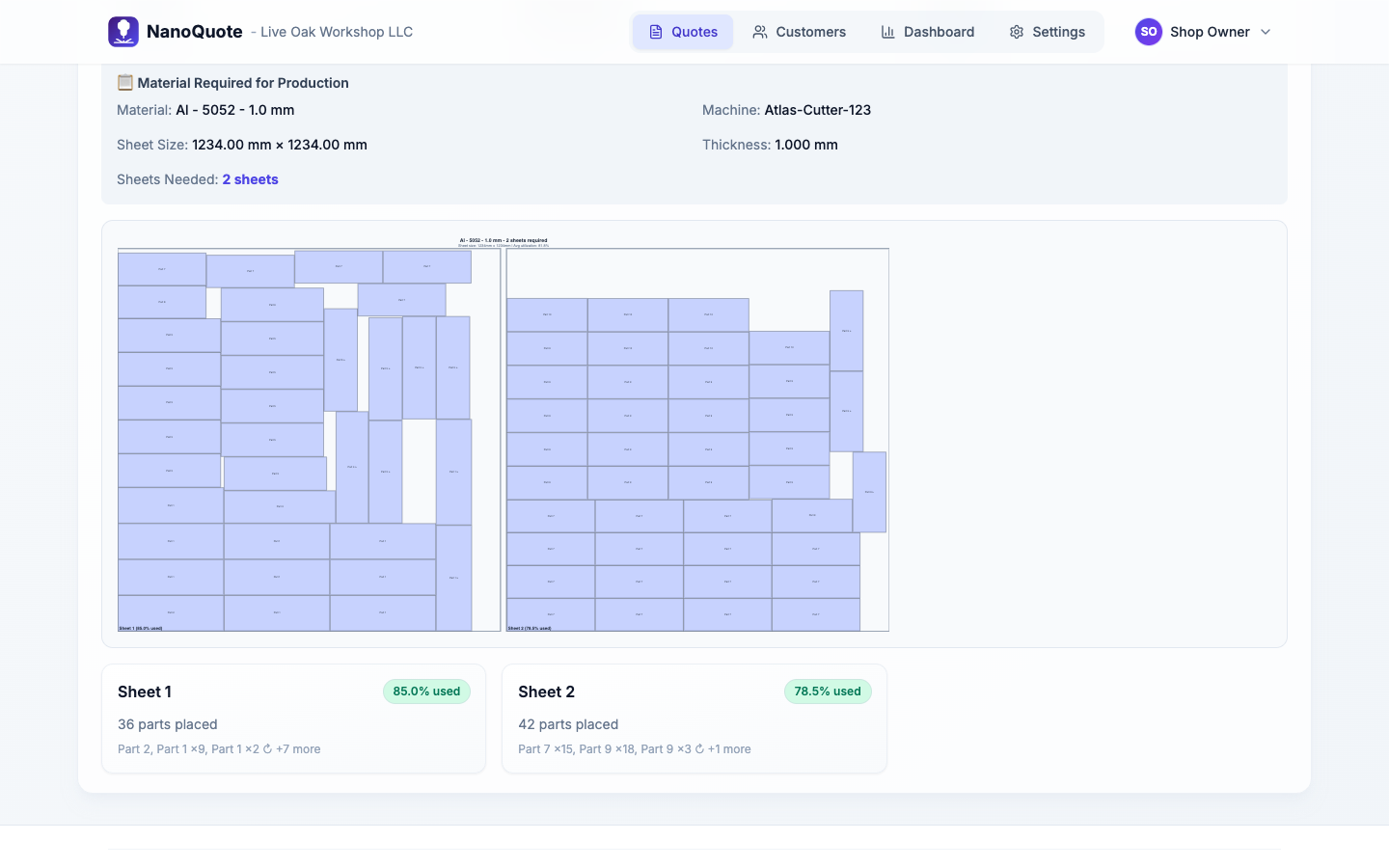
See how parts fit on sheets before you finalize a quote. Know your billable sheet count, utilization percentage, and material cost - not after you cut, but before you send the price.
What happens without nesting visibility
You guess at utilization
Assuming 75% utilization when you're actually getting 50% means underpricing material by a third.
Fractional sheets cost you money
A job needs 2.1 sheets. You quoted 2. Now you're eating the third sheet.
Part spacing is ignored
Parts don't pack edge-to-edge. Kerf, lead-ins, and spacing all reduce yield.
No sanity check before committing
You don't know the real sheet count until production. By then, the price is locked.
Material load time is a guess
More sheets = more loading. If you don't know sheet count, you can't charge accurately for setup.
How nesting preview helps you quote right
Add parts and set quantities
Define the parts from your DXF file with quantities. NanoQuote knows the bounding box dimensions for each part.
Run nesting from the quote editor
Click to calculate nesting. NanoQuote arranges parts on sheets based on your material's configured sheet size.
See visual layout and utilization
Preview how parts fit. See total sheet count, utilization percentage, and any inefficiencies.
Review billable sheets
NanoQuote calculates how many sheets you'll actually consume - including fractional usage and minimum billable thresholds.
Adjust before sending
If utilization is lower than expected, adjust pricing or quantities before the customer sees the quote.
Nesting and material tracking features
Nesting preview visualization
See parts arranged on sheets with a visual layout. Understand how geometry fills available material.
Sheet count calculation
Know exactly how many sheets the job requires - full sheets plus fractional remainder.
Utilization percentage
See what percentage of sheet area is actually used for parts vs scrap.
Billable sheet math
Configure minimum billable utilization per material. If a job uses 15% of a sheet, you might still bill the full sheet.
Material load fees
Automatically calculate load/unload time per sheet based on your operator rate. More sheets = higher load charges.
Material adjustment option
If nesting changes the material cost significantly from your estimate, apply an adjustment line item to reconcile.
Why nesting preview matters for quoting
Frequently asked questions
No - it's a planning-level estimate for quoting. It gives you realistic sheet counts and utilization, but for final production nesting you'd use your CAM software's optimizer.
Some shops bill full sheet price unless utilization exceeds a threshold (e.g., 15%). If a job only uses 10% of a sheet, you'd still charge for the whole sheet. Configure this per material.
The nesting preview includes configurable part spacing. It's designed for quoting accuracy, so it errs on the side of leaving room rather than packing too tight.
Sheet size comes from your material configuration. Part spacing is set at a reasonable default for quoting. For production-optimized nesting, use dedicated CAM software.
NanoQuote doesn't manage remnant inventory, but you can adjust material pricing or sheet size for specific quotes if you're using partial sheets.
Nesting updates the billable sheet count, which drives material cost and load fees. If the nested result differs significantly from your estimate, you can apply a material adjustment.
Related resources
Ready to quote faster and more accurately?
Start with 5 free quotes - no credit card, no commitment. See how NanoQuote fits your shop.