Stop underquoting material - see sheet usage before you send
That moment when you realize the job ate three sheets instead of two? NanoQuote shows you nesting and billable sheet counts before you commit to a price. No more material surprises.
How material underquoting happens
Guessing utilization
You estimate 80% utilization, but the actual nest comes out at 55%. That's a lot of scrap you just ate.
Forgetting part spacing and kerf
Parts don't pack edge-to-edge. Spacing, kerf width, and lead-ins all eat into your material yield.
One extra sheet sneaks in
The job needed 2.1 sheets. You quoted 2. Guess who's paying for that third sheet?
Material cost calculated from part area alone
Part area × material price sounds simple, but it ignores how parts actually fit on sheets.
No visibility until production
You don't see the real nest until you're programming the machine. By then, the quote is locked.
Minimum sheet charges not baked in
Even if you only use 30% of a sheet, you often have to buy the whole thing. That cost needs to show up somewhere.
How to quote material correctly
Run nesting before you finalize the quote
See how parts actually fit on sheets - including spacing, rotation, and quantity multiples. Know your sheet count before you send.
Track billable sheets, not just part area
If the job uses 2.3 sheets, quote 3. NanoQuote shows you billable sheet counts with fractional usage.
Factor in minimum utilization thresholds
Some shops bill full sheet price unless utilization exceeds a threshold (e.g., 15%). Configure this per material.
Compare quoted vs actual material cost
NanoQuote warns you when nesting results differ from initial estimates, so you can adjust before sending.
Include material load time in the quote
Loading and unloading sheets takes time. Charge for it based on your operator rate and the number of sheets.
What NanoQuote does for material accuracy
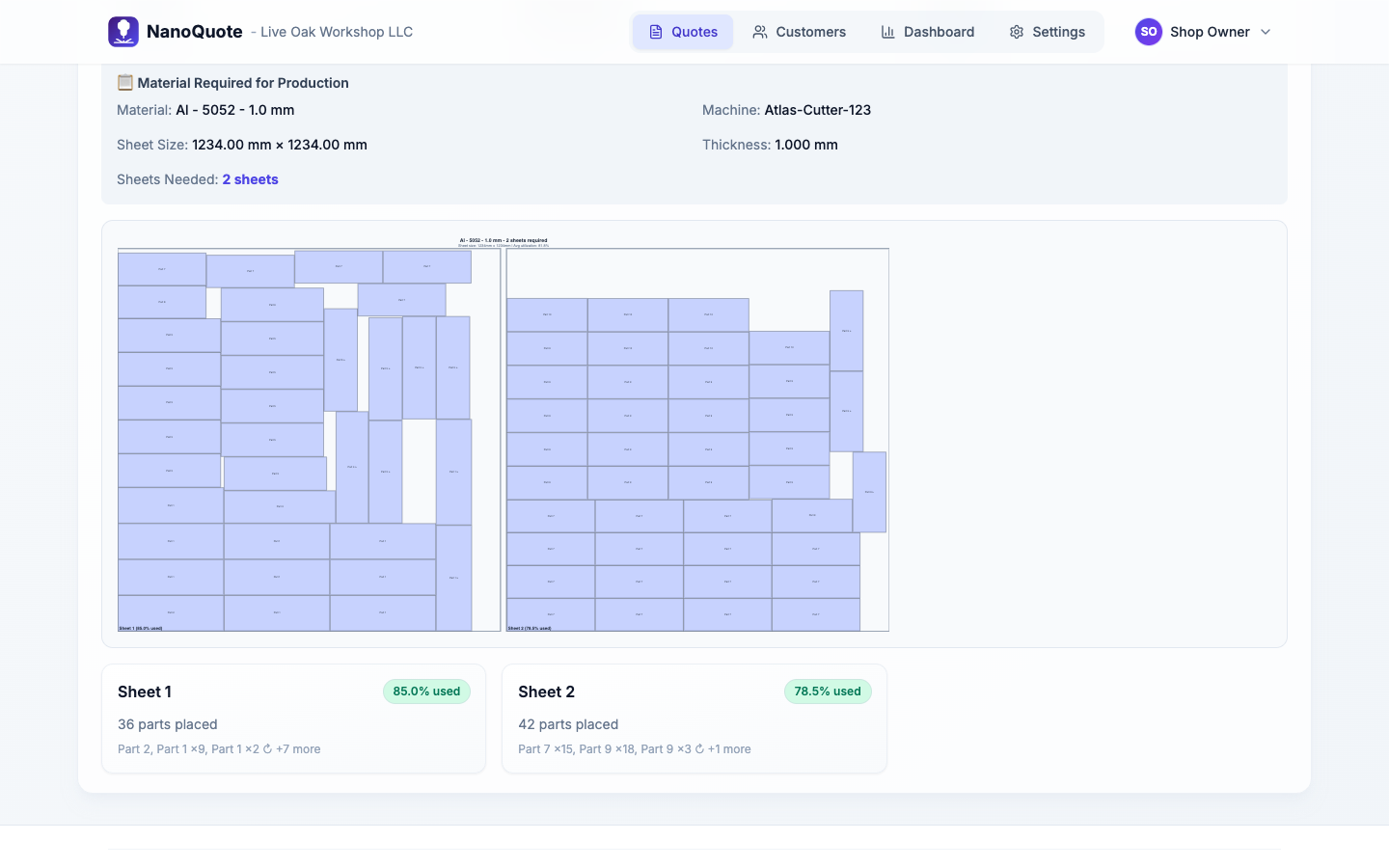
Nesting preview
See a visual layout of parts on sheets. Know your sheet count, utilization percentage, and scrap area before quoting.
Billable sheet math
NanoQuote calculates how many sheets you'll actually consume, including fractional usage and minimum billable thresholds.
Material load fees
Automatically add load/unload time per sheet, calculated from your operator rate. More sheets = more load charges.
Utilization warnings
If actual utilization differs significantly from your quoted estimate, NanoQuote flags it so you can adjust.
Per-material configuration
Set sheet size, price, cut speed, and minimum billable percentage per material. Rates apply automatically to every quote.
Material adjustment option
If nesting changes the material cost significantly, apply a material adjustment line item to reconcile the difference.
Why shops trust NanoQuote for material pricing
Frequently asked questions
It's a planning-level estimate designed for quoting, not a production optimizer. It gives you a realistic sheet count and utilization percentage so you can price material correctly. For final production nesting, you'd still use your CAM software.
A billable sheet is a sheet you need to buy or pull from inventory to complete the job. If a job uses 2.3 sheets, you need 3 sheets. NanoQuote tracks this and lets you set minimum utilization thresholds (e.g., only bill full sheet price if usage exceeds 15%).
Yes. If nesting reveals that actual material usage differs from your initial quote, you can add a material adjustment line item to reconcile the difference before sending.
The nesting preview includes configurable part spacing. It's designed for quoting accuracy, not tight production nesting, so it errs on the side of leaving room.
NanoQuote doesn't manage remnant inventory directly, but you can adjust material pricing or sheet size for specific quotes if you're cutting from a partial sheet.
Related resources
Ready to quote faster and more accurately?
Start with 5 free quotes - no credit card, no commitment. See how NanoQuote fits your shop.