Tube cutting quotes from STEP files
Quote round, square, and rectangular tube jobs with stick allocation, pierce-aware machine time, and customer-ready stock assumptions. Tube quoting is in beta — feedback is welcome.
What goes wrong quoting tube jobs manually
Stick count is a guess
You estimate one stick when the job actually needs two — or bill two when one stick would have worked with smarter nesting along the tube axis.
Hole pierce time is ignored
A tube with four radial holes is not the same as a blank. Spreadsheet math that only counts part length misses pierce time on every hole and end cut.
No drop or remnant visibility
Without 1D allocation, you cannot show billable utilization, estimated drop, or reusable remnant length before the customer commits.
Sheet formulas on tube work
Part area × sheet price does not apply to linear tube stock priced per stick, meter, or foot with chuck loss and part spacing.
Quotes sent over stock capacity
A part longer than available stick length should block the quote — not become a surprise after you win the job.
How to quote a tube job in NanoQuote
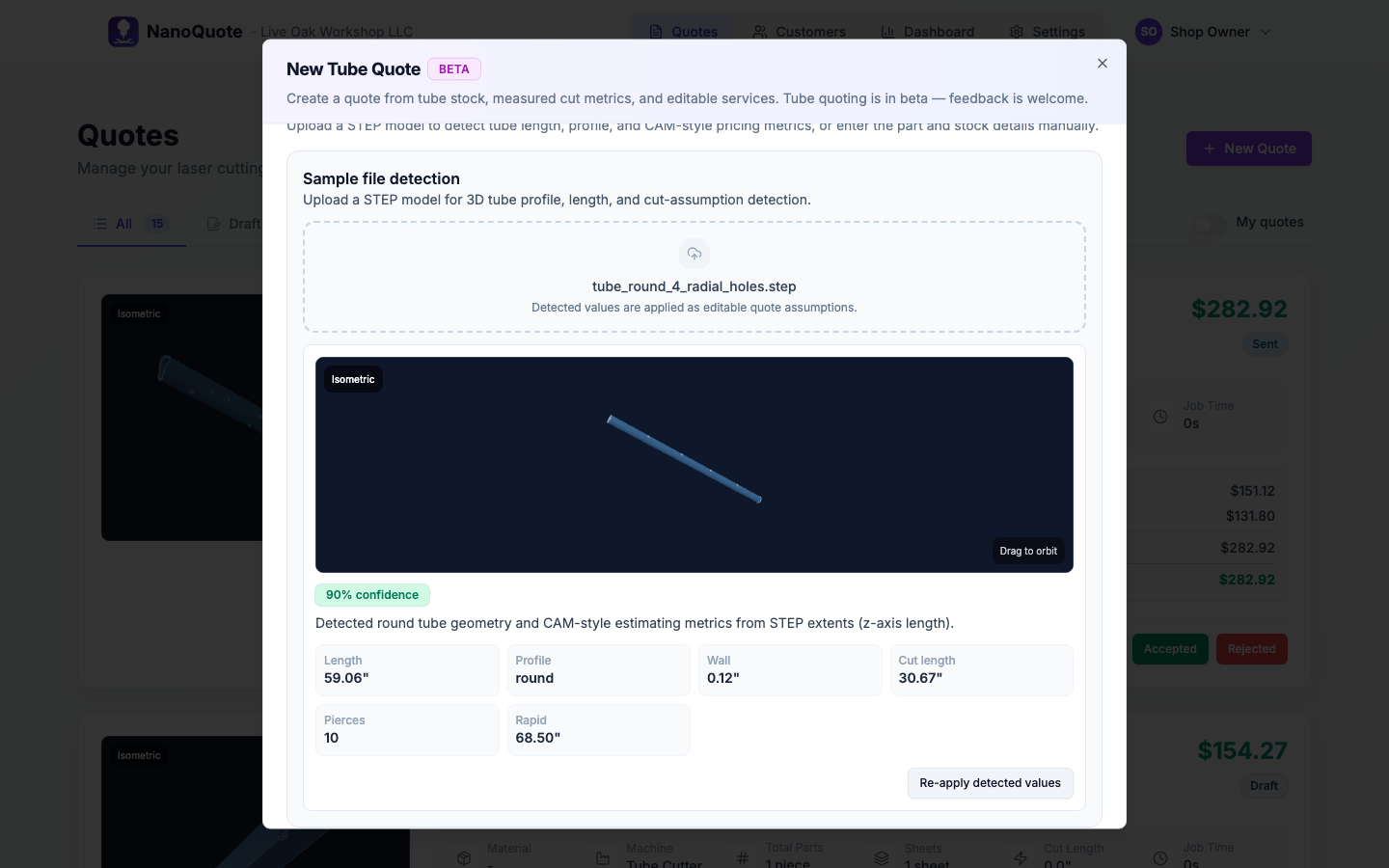
Upload a STEP file
NanoQuote detects round, square, or rectangular tube profiles, part length, and CAM features like holes and slots. Flat sheet solids are rejected with guidance to use sheet quoting instead.
Select tube stock
Pick from your tube stock catalog — profile, wall thickness, stick length, and price basis (per stick, meter, or foot). Matching stock can be suggested from detection.
Review cut metrics and quantity
Confirm part length, quantity, cut length, pierce count (end cuts plus holes), and rapid travel. Override when you know the job better than the template estimate.
Review 1D stick allocation
See billable sticks, billable utilization, estimated drop, minimum material uplift, and remnant estimates before you send the price.
Share Tube Stock Assumptions
Customer quote links show tube parts and a Tube Stock Assumptions summary so buyers understand how material was planned.
Tube quoting features
STEP tube detection
Server-side geometry analysis classifies tube vs flat sheet vs solid block so the right quoting flow is used automatically.
Tube stock catalog
Configure round OD, square, and rectangular profiles with wall thickness, stick length, pricing basis, and minimum stock percentage.
Tube laser machine settings
Profile limits, max stock length, chuck and tail loss, trim, kerf, part spacing, linear cut speed, pierce time, and setup/load times.
1D stick allocation
Plan billable sticks, utilization, drop, and remnant estimates — the tube equivalent of sheet nesting visibility.
System setup and load fees
Tube setup and load/unload fees are generated from your machine and stock configuration, not typed in by hand every quote.
Mixed assembly quotes
Combine sheet laser parts and tube parts on one quote when a job needs both flat and tubular work.
Why tube shops use NanoQuote
Frequently asked questions
Tube quotes use STEP files only. DXF and SVG remain sheet workflows. If a STEP file is a flat sheet part, NanoQuote directs you to sheet laser quoting instead.
Round, square, and rectangular tube profiles with configurable wall thickness, stick length, and pricing basis.
Tube quoting is in beta and enabled per organization via the tube_quoting feature flag. Contact us if you want early access for your shop.
Sheet jobs use 2D nesting on rectangular sheets. Tube jobs use 1D allocation along stick length — billable sticks, drop, and remnants instead of sheet count and utilization on a plane.
Yes. Mixed assembly quotes support sheet laser line items and tube line items together with process-appropriate planning for each.
No. Tube quotes are estimate-first. They produce pricing, stock allocation assumptions, and customer-ready documentation — not machine output.
Related resources
Ready to quote faster and more accurately?
Start with 5 free quotes - no credit card, no commitment. See how NanoQuote fits your shop.