
Quote calculator (pricing breakdown)
Understand totals and how materials, machines, and services affect pricing.
The quote calculator gives you a live breakdown of how NanoQuote turns part geometry, materials, and services into customer-facing pricing.
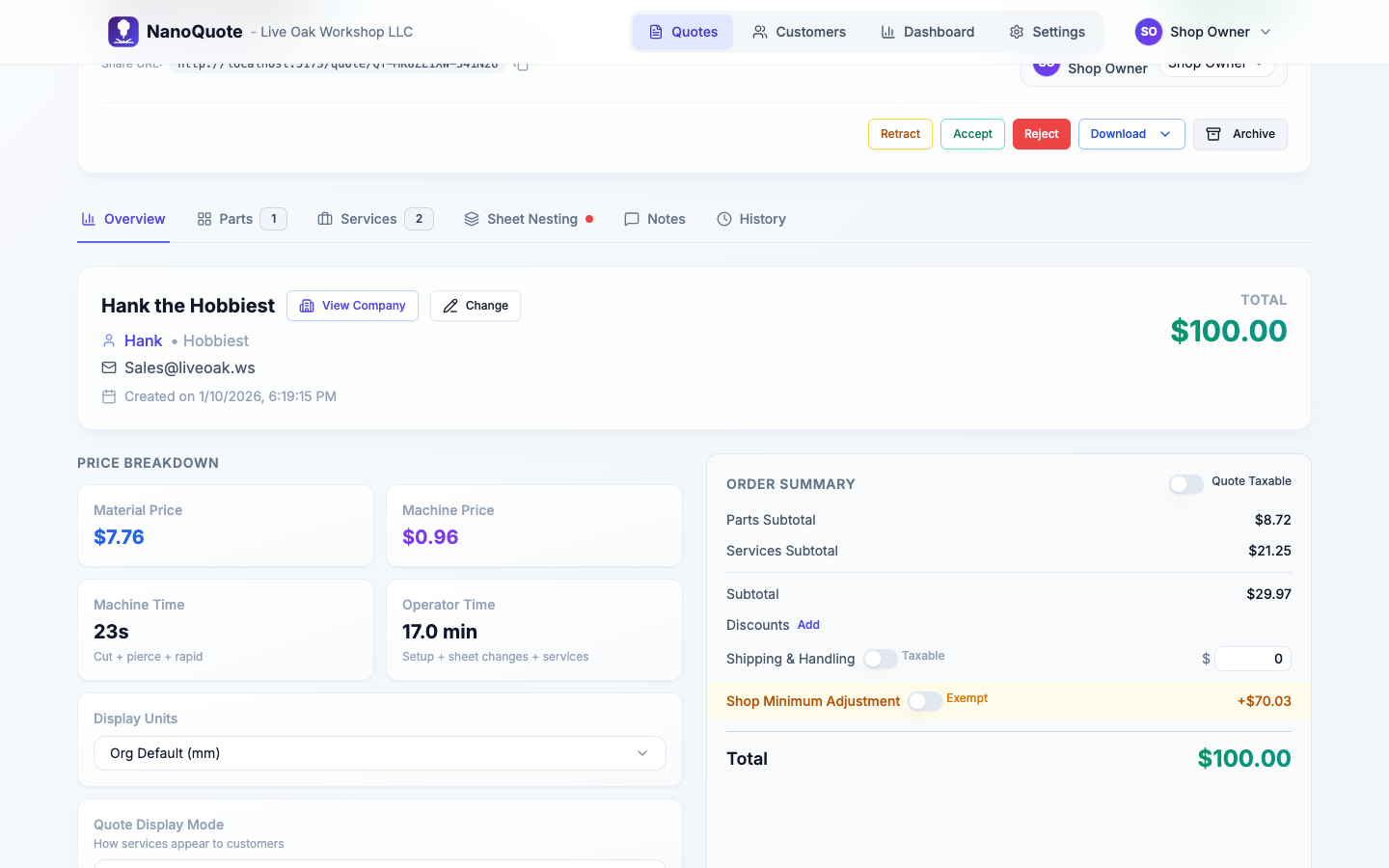
Where you see the calculator
- Quote editor -> Overview tab: the Totals card and breakdown list update instantly as you edit a quote.
- Quote editor -> Parts tab: each part line shows unit price contributors (material, machine, part services).
- Quote editor -> Services tab: quote-level services feed totals automatically (part-level services appear under their parts).
Use this view to sanity-check pricing before you send the quote link to your customer.
Inputs that drive pricing
Parts and geometry
- Cutting length, pierce counts, bounding boxes, and rapid moves come from the DXF/SVG geometry you approved during upload.
- Material and Machine selections determine cutting speeds, sheet pricing, and setup behavior. Override them per part when needed.
- Quantity is per line item; changing it updates the part contribution instantly.
Services and pricing modes
- Quote-level services cover items like programming, freight, or finishing.
- Per-part services inherit the linked part's quantity automatically (great for deburring or coating per piece).
- Per-batch services bill once per production run; the calculator charges the unit price a single time no matter the quantity.
- Always show as line item keeps a quote-level service visible even when Part costs mode is used.
- Time-based services calculate unit price from minutes × rate (stored per service line).
System services (auto-generated)
- Setup fees appear once per machine used and default to the organization baseline operator rate (stored on the service line).
- Material load fees update after nesting to reflect fractional sheet usage (for example, 0.25 sheets).
- Material adjustments are optional corrections suggested by nesting to reconcile quoted vs actual sheet cost.
Quote defaults
- Tax rate, Quote taxable, and Shipping & Handling fields influence tax totals and the final customer price.
- Display units only affect presentation, not pricing.
- Baseline operator rate (Settings → Configuration → Settings) is used as the default for time-based services, but each service line stores its own rate.
Nesting results
- Re-running nesting updates sheet counts, utilization, and whether any parts exceed machine limits.
- The Nesting tab compares the quoted material total with the billable sheet spend from nesting.
- If the gap is large, NanoQuote suggests a material adjustment line you can accept (or edit).
- Minimum billable percentages come from each material's Minimum Sheet % to bill setting.
Understanding the totals panel
| Field | Description |
|---|---|
| Lines subtotal | Sum of all parts and services after unit price x quantity (per-batch services count once). |
| Parts subtotal | Portion of the subtotal that comes from part line items. |
| Services subtotal | Portion of the subtotal from services, including automatic setup/material fees. |
| Material total | Material portion of each part's unit price multiplied by quantity. |
| Machine total | Cutting plus rapid-travel costs for each part. |
| Sheet count | Physical sheet count supplied by nesting (rounded to the nearest fractional increment set on the material). |
| Billable sheet count | Sheet quantity after rounding up according to the material's minimum billable percentage (for example, 0.25 = quarter sheet increments). |
| Taxable amount | Sum of taxable lines, plus shipping if Shipping taxable is checked. |
| Tax total | Calculated tax (Taxable amount x Tax rate). |
| Shipping & Handling | Manual charge you add on the Overview tab; can be taxable or non-taxable. |
| Grand total | Customer-facing price: Lines subtotal + Shipping & Handling + Tax total. |
Hovering over values in the app reveals tooltips with the same definitions.
Making adjustments
- Change part quantities or defaults: edit directly in the Parts tab to see instant recalculations.
- Swap materials or machines: use per-part overrides or the Overview defaults, then run Recalculate quote if prompted.
- Add or adjust services: per-part and per-batch modes ensure you do not need to hand-edit quantities.
- Update baseline operator rate (org settings) or edit time-based service minutes/rates directly on the line.
- Run nesting: updates sheet usage, load fee quantities, and suggested material adjustments.
- Review display mode: switch between Line items and Part costs to control how services appear on customer quotes.
Quick troubleshooting
- Something feels off: check for outdated material/machine versions and re-price or re-run nesting.
- Tax looks too high: confirm the
Quote taxabletoggle or mark lines as non-taxable. - Setup fee missing: verify the machine has a non-zero setup time and that the baseline operator rate is set.
- Material load quantity stuck at 1: re-run nesting; load fees update once the job finishes.
- Per-part service quantity wrong: quantities auto-sync from the linked part; edit the part line instead of the service.